Roles and Accounts
Roles and accounts setup the level of access that account users have into the system. Roles have to be stablished before assigning to the accounts.
Roles
Tools > Accounts > Roles
Determine what type of access a user should have when using the web application. They control the levels of management and visibility of the user account.
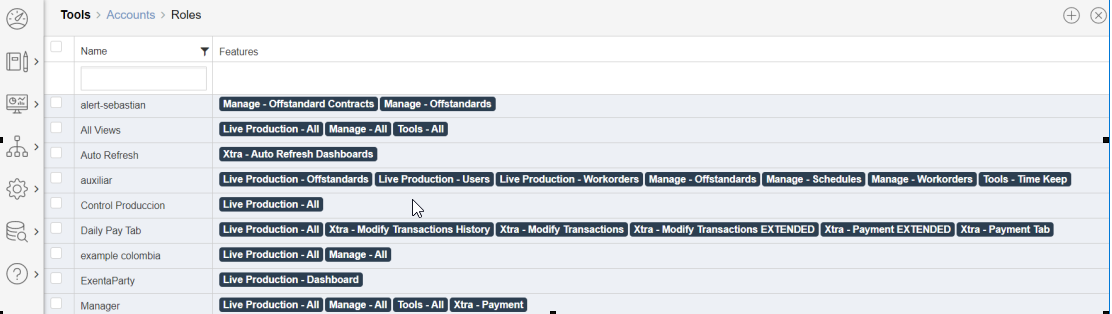
- Live Production - allows access to the items in the Live Production menu. Typically this would be used for a member of staff that needs to see production information, but does not need to make any changes.
- Manage - allows access to the items in the Manage menu. Typically this would be used for senior staff and managers as it allows changes to be made to the data
- Tools - allows access to the items in the Tools menu. Typically this would be used for senior staff and managers as it allows changes to be made to the data
- Reports - allows access to the items in the reports menu.
- Xtra - this does not relate to a menu exactly. These are extra features that can be added to give a user greater administrative capabilities.
- Payment - Enable Pay Column in Entire Application which display Payment.
- Payment extended - Enable Save, Cancel And Create Button in Daily Pay tabs.
- Modify transactions -Enable CheckBox in transaction Screen and allow Update and Split button to update any transaction.
- ModifyTransactionHistory --> Allow user to modify transaction History.
- Modity transactions Extended - Team Leader Screen Mass Insert Button will be visible.
- Allow user to Insert Transaction.
- It also Enabel "SMV" and "Operation" Fields in Transaction Modify screen.
- Purge Work Orders - In "Live Production/Workorder" screen it enable "purge" Button. IT is also enable for companyAdmin.
- Time Keep Multi Users - The User Dropdown list in Time Keep screen will visible.
- ReadOnly - Will remove Save and Delete buttons from All Manage Screen.
- XtraJobSchedules --> Will enable below Jobs for User to create.
- ResetProduction
- ResetLocation
- FinalizeDay
- DailyPayJobs
- ReportService
- PopulateDepartmentCapacity
- WeeklyFormula
- Average
- LastWeeksPayJobs
- WorkorderCreation
- PaytabLive Production User Enable Daily Pay Tab - Live Production User Detail Enable Daily Pay Tab.
- XtraMassInsert - Team Leader Screen Mass Insert Button will be visible.
Copyright © 2020 by Aptean. All rights reserved.
Created with the Personal Edition of HelpNDoc: Keep Your PDFs Safe from Unauthorized Access with These Security Measures